Summary: Google is finally rolling out Create My Widget, a new AI-powered text-prompt widget builder, to Pixel 10 and Pixel 11 series phones through the November 2026 Pixel Feature Drop. The feature will allow users to create custom widgets and add them directly to their home screens.
Google released a number of new additions to the Pixel 11 and the Pixel 10 series of devices with the November 2026 Pixel feature drop yesterday and one of the key highlights was the new Create My Widget feature. It turns a plain-language description into a working home screen widget, to let users create their own personalized widgets.
How Create My Widget Works on Pixel
Google announced the Create My Widget feature in the blog post for the November 2026 Pixel Drop. However, it isn’t the first time we are hearing about it. Google first showed it off back in May as a Googlebook laptop exclusive. And it is only now making its way to phones. Here’s how Google describes it:
Create personalized widgets, like a tracker to follow your monthly spending, a game day widget with your team colors, or a getaway countdown that automatically pulls in flight and reservation details. Your home screen can be as personalized as you want it to be.
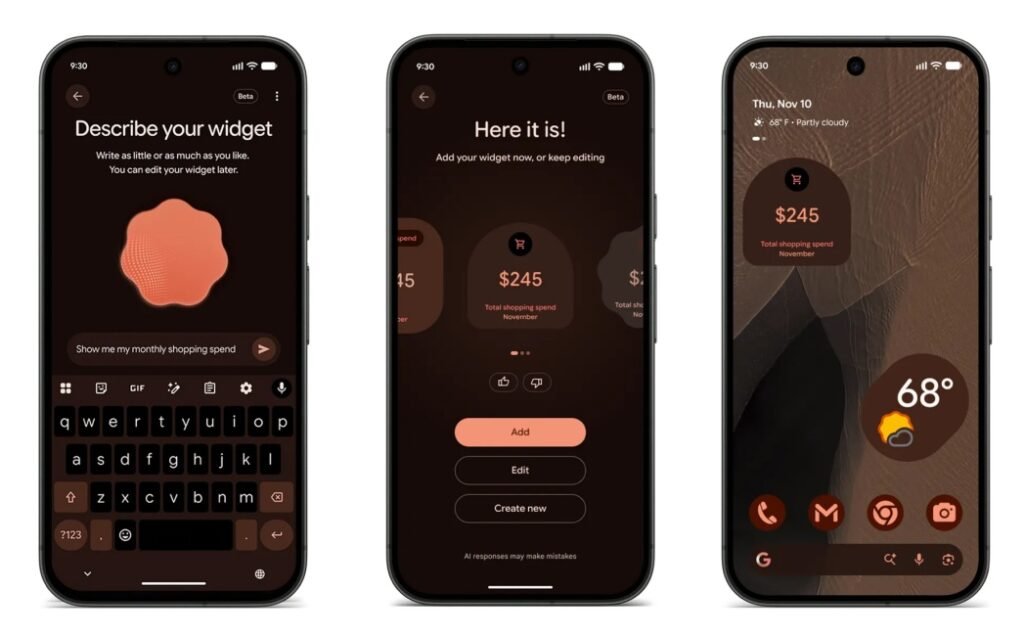
The feature is fairly easy to use. Users need to go to the “Describe your widget” screen, and typing something like “show me my monthly shopping spend” generates a carousel of Material-style widgets with dedicated icons and live totals. From the preview screen, they can add the widget straight to the home screen, edit the output, or start over.
Create My Widget is rolling out to the Pixel 10, Pixel 10 Pro, Pixel 10 Pro XL, Pixel 10 Pro Fold, Pixel 11, Pixel 11 Pro, Pixel 11 Pro XL and Pixel 11 Pro Fold in select regions and languages. It is also coming to Pixel Watch 4 and 5 as confirmed by Google in their post. However, Pixel 10a will miss out on this feature.
The idea of describing a widget into existence is not new. Nothing beat Google to it with Playground, a similar builder tool for what it calls Essential Apps, which launched on the Nothing Phone 3 earlier this year. Nothing’s version leans further into full mini-apps rather than just widgets, letting users upload their own images, branch between versions, and publish finished apps to a shared gallery for others to use.
Google’s take is narrower by comparison, sticking to curated widget layouts but it is likely to grow into full fledged app builder later down the line.

Amit Rahi is a tech journalist with over seven years of experience testing gadgets and exploring consumer technology. He covers smartphones, laptops, audio products, and emerging innovations, combining hands on testing with practical insights to help readers make informed decisions. His work focuses on product reviews, technology trends, and making tech easy to understand.